Community clothing glitches with written steps and video guides. Requirements (host vs invite, player count) are noted where they matter.
Save The Noose Outfit
- Make sure your character isn’t wearing a saved outfit. For safety wear only a t-shirt, jeans, and shoes—no accessories, hats, or glasses.
- Start The Big Con heist finale with Gruppe Sechs as the entry disguise and NOOSE as the exit disguise. Exit and buyer don’t matter; you won’t complete the heist. You will not lose your progress.
- Proceed as normal until just before you get to the laundry room to change disguises. You must have remained undetected.
- When standing next to the disguise, press your contextual button to start the disguise change. Immediately after, hold your interaction menu button.
- If the interaction menu doesn’t appear, quick restart and try again.
- Go to Style → Illuminated Clothing. Cycle between options for 10–15 seconds.
- (Optional) Close the interaction menu fully then repeat step 5 to help trigger a cloud save.
- Go to your platform’s dashboard with the game running in the background. Wait exactly 2 minutes before returning to the game.
- Press continue on the “kicked for inactivity” prompt. You should load into a public session with the outfit on.
- If you didn’t spawn with the outfit, retry and follow every step. It can take 2 tries; some get it first try.
If you spawn with a parachute over the outfit or can’t access clothing stores (game thinks you’re wearing a duffle bag):
- Go to the mask store. Use any air vehicle, jump out at high altitude, and deploy your chute. Land as close as possible to the rack with tops and enter the clothing menu before the parachute-removal animation finishes.
- Save the outfit, exit, then save again when the parachute is off.
Invisible Arms (Male & Female)
These stick after death and don’t disappear after 20 seconds like some other glitches.
- Go to a clothing store.
- Purchase the scuba suit and save it as an outfit.
- Purchase a bodysuit and have it equipped (any kind).
- Go to the telescopes on the beach.
- With the bodysuit equipped, do the telescope glitch and select the scuba suit. When you walk away your head should look glitched.
- Go to the tops section at the Vespucci Beach masks store and buy a vest.
- Go into the water (without using a car; a bike is fine) and take the easy way out.
- You should spawn with no arms. Save the outfit.
Yellow Rebreather
- You (or a friend) need the Bugstars Big Con approach for the Diamond Casino Heist ready. Settings don’t matter.
- On the outfit selection screen, select the yellow rebreather.
- Ready up. When you spawn outside the arcade, open the interaction menu. (If it doesn’t open, throw gas at your feet until you die and quick restart.)
- Go to Style → Illuminated clothing and hold right D-pad for 20–30 seconds.
- Scroll up to Auto show aircraft helmet and spam right D-pad for 20–30 seconds.
- Scroll back to Illuminated clothing and hold for 30–40 seconds.
- When finished, do not close the interaction menu—wait to be kicked. (Tip: going to your home/dashboard gets you kicked faster.)
- After you’re kicked, accept the alert. Either you load in with the outfit (save it) or you load into story mode (start GTA Online → Invite Only and save the outfit).
- (Optional) To transfer it onto other outfits: select the saved outfit, do the telescope glitch, and select the outfit you want it on.
If you didn’t get it: Your friend got kicked before you (have them move around), you closed the interaction menu, or you didn’t hold the options long enough.
Colored Duffel Bags (No Husky Jobs / No Director Mode)
- Select the outfit you want the duffel bag on.
- Select one of the listed setups (see variants above).
- Deliver the first bag as normal.
- For the second bag, parachute into the garage (helicopter or Oppressor Mk2).
- If you lose your helmet, go outside the arcade and reselect your outfit.
- Go to any Ammunation and purchase the Israel chute bag.
- Equip it and go to the mask store.
- Parachute in front of the mask store. When the chute comes off you should have the duffel bag.
- To save: get back in your vehicle, parachute into the mask store, and spam right D-pad.
- After crashing you should be in the mask store menu. Press X or Square to save.
- Select a different outfit then switch back to your duffel bag outfit.
Glitched Joggers
Black
- Host the MOC mission Work Dispute.
- Go to your apartment.
- Blow yourself up next to your apartment door.
- You should be able to walk inside. Save the outfit and quit.
Red
- Get invited to the MOC mission Work Dispute.
- Go to your apartment.
- Blow yourself up next to the apartment door.
- Walk inside, save the outfit, and quit.
Purple
- Start the Rockstar Created Versus Crooked Cop.
- Set Clothing to Themed.
- In character selection set the clothing theme to Insects. You should be a purple insect.
- When the job starts: Interaction Menu → Style → Illuminated Clothing, hold 20–30 sec.
- Scroll to Auto show aircraft helmet, hold 20–30 sec.
- Back to Illuminated Clothing, hold 30–40 sec.
- Without closing the interaction menu, wait until you get kicked.
- Back in freemode, save the outfit at Ammunation.
Orange
- Get invited to Crooked Cop.
- Friend sets Clothing to Themed; in character selection set theme to Insects. You should be an orange insect.
- When the job starts: Interaction Menu → Style → Illuminated Clothing 20–30 sec, then Auto show aircraft helmet 20–30 sec, then Illuminated Clothing 30–40 sec.
- Wait to get kicked without closing the menu.
- In freemode, save at Ammunation.
Tan
- Go to the clothing store closest to Legion Square.
- Set spawn to Last Location. Register as CEO and set outfit style to Warlord.
- Start the Rockstar Created Survival Legion Square Survival.
- Run to the clothing store quickly. Throw two sticky bombs on the door and quit through the phone.
- You may spawn as your own outfit (skip to step 9) or as Warlord—if Warlord, switch sessions until you’re your own outfit.
- Run into the store to the cashier and press right D-pad so the clothes menu opens.
- You’ll get kicked off it. Retire as CEO and save the outfit.
Paramedic Outfit
- Start or get invited to Act 1 Setup.
- Be on the paramedic outfit team and select your preferred outfit.
- After loading in, blow up the ambulance.
- Tell your friend to press A or X to continue.
- Turn your controller off when you see “Continuing” change to “Downloading” in the bottom right.
- When you hear yourself going up the elevator, turn the controller back on.
- If you have no minimap, have your friend leave and start an invite-only session.
- Make your way to an Ammunation.
- Purchase an earpiece (or equip one if you have them all).
- Join your friend’s invite-only and save the outfit.
If Ammunation is closed, the timing was off somewhere—retry.
Outfit tools & resources
Same categories as the Tools → Outfits & Clothing section: component lists, merge guides, and playlists.
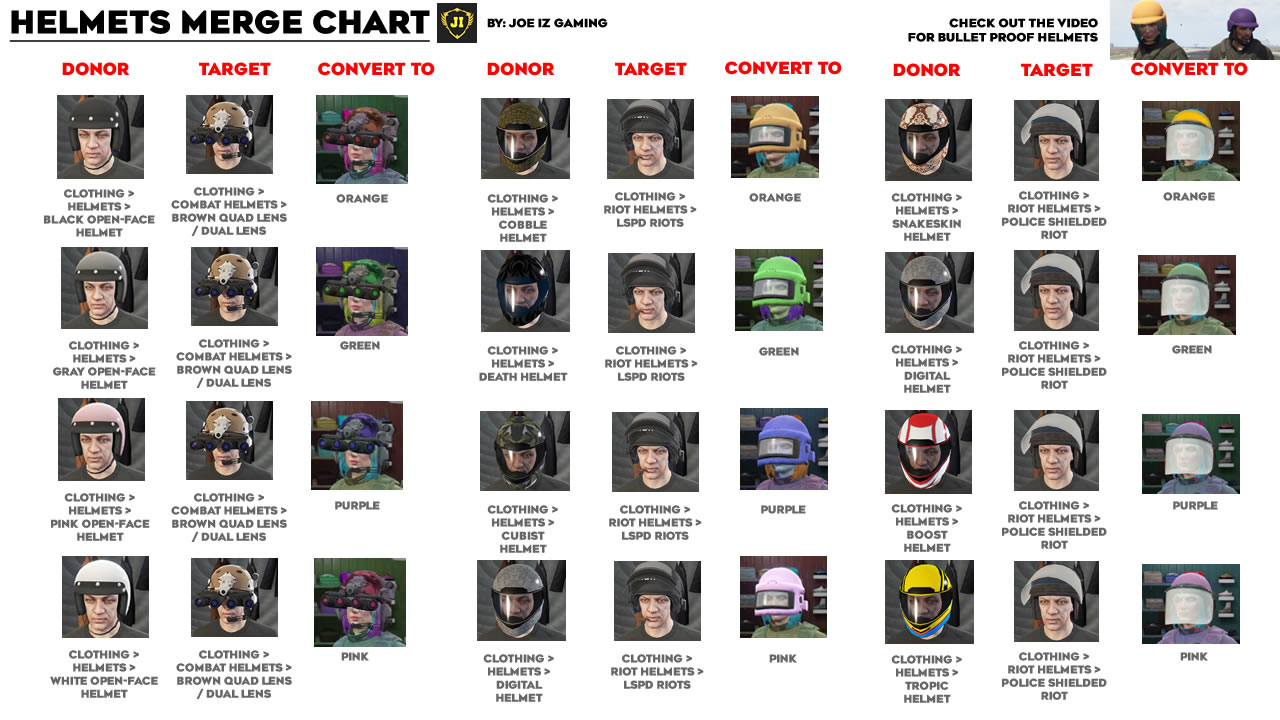
Helmets Merge Chart
By Joe Iz Gaming. Donor + target = convert. Use for open-face, LSPD Riots, and Police Shielded Riot helmets.
Related
Useful Tools — Outfit lists, merge charts, more resources. · Discord — Ask for help or share glitches.